


Symantec Endpoint Protection (SEP) 14 Upgrade
NTS will be deploying the virus and malware protection software, Symantec Endpoint Protection upgrade to version 14 on Monday, 18 September 2017.
FAQ
The virus and malware protection software, Symantec Endpoint Protection (SEP), will be upgraded to version 14 MP2.
You’ll be able to choose when you’d like to run this upgrade through Thursday, 11:59pm, 21 September - after that the upgrade will run automatically. This upgrade will automatically restart your computer twice. Any unsaved work left open before the upgrade process starts will be lost. To avoid this, please choose the time to upgrade that best fits your schedule. The upgrade will be available to run at your convenience until 12:01 AM Friday, 22 September 2017, then the upgrade will run automatically.
SEP 14 MP2 is a major version upgrade from the currently deployed SEP 12.1.6 MP6. SEP is the security suite used across the University of Alaska system and includes the following features: antivirus, intrusion prevention, file behavior monitoring, application and device control, memory exploit mitigation, reputation analysis, machine learning, and more.
Windows users will need to make sure to save and close any work before you start the upgrade, or before you leave your workstation Thursday evening. The upgrade for Windows will be available for you to run at your convenience until Friday 22 September 2017, at 12:01 AM. At the scheduled time the upgrade process will automatically occur. Any documents left open and unsaved before the upgrade process is started will be lost when the computer is restarted during the installation process.
The upgrade for macOS will run at the scheduled time, Friday 22 September 2017, at 12:01 AM. Once the upgrade is completed, you will be prompted to restart your computer at your convenience. Unlike the Windows upgrade there is not an option to run the upgrade early.
Anyone with a laptop outside the University network during the scheduled upgrade time will have the upgrade run as soon as the laptop returns to the University network.
Interested in the technical details?
How to Run the SEP 14 Upgrade Early
Windows
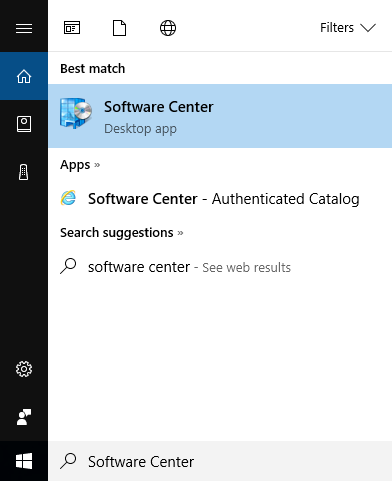
- Search for "Software Center" from the Start Menu, and open the Software Center app.
- In Software Center, you should find "Symantec Endpoint Protection 14 MP2" under "Available
Software." Select it, and click the "Install" button.
NOTE: Make sure to save your work and close your programs before starting this installation. This upgrade process will automatically restart your computer.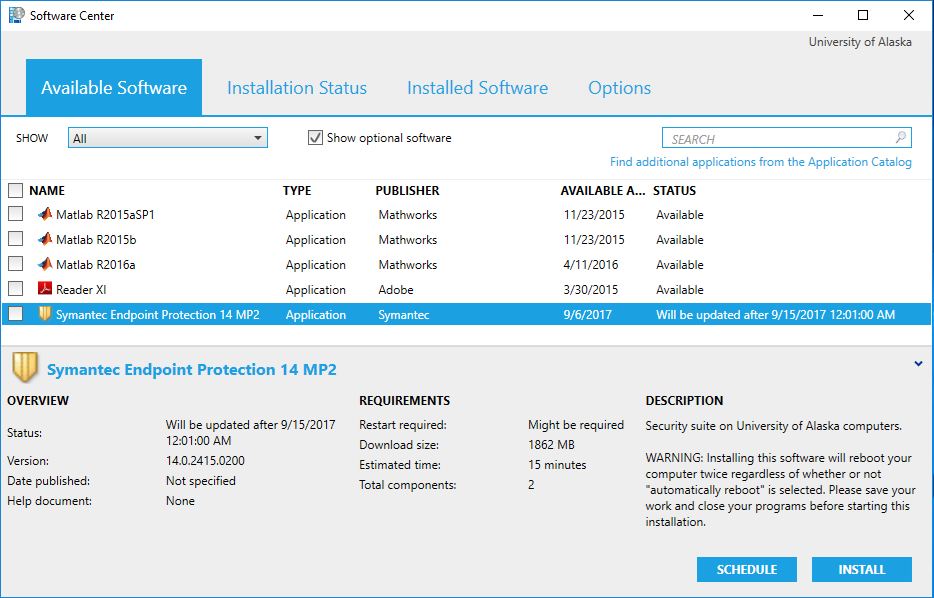
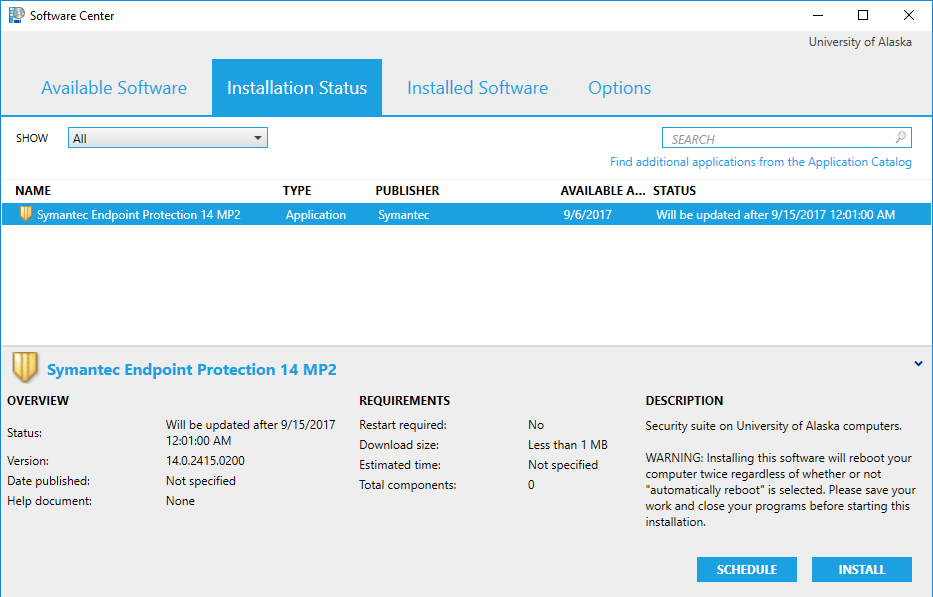
- Software Center will switch to the "Installation Status" tab. Select "Symantec Endpoint
Protection 14 MP2" and click the "Install" button again.
- The "Status" should change to "Waiting to apply changes.
Note: you may see some informational notices regarding the installation between this step and step 6. These can be ignored.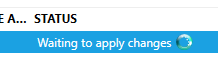
- Windows will restart after SEP 12 is uninstalled.
- Following the first restart, SEP 14 will be installed. Once the SEP 14 installation
is complete you will be prompted to restart Windows.

- After the second restart the SEP 14 upgrade will be complete.
macOS
The upgrade for macOS will run at the scheduled time, Friday 22 September 2017, at 12:01 AM. Once the upgrade is completed, you will be prompted to restart your computer at your convenience. Unlike the Windows upgrade there is not an option to run the upgrade early.